

DirectX 12 is mandatory across all PC tiers — install it alongside whichever GPU and CPU combo you’re running. An SSD with 150 GB of free space is also non-negotiable on PC and Mac.
PC system requirements
All PC tiers share the same OS (Windows 10 64-bit 22H2 or newer), 16 GB RAM, and 150 GB SSD requirement. What changes between tiers is the GPU, CPU, graphics preset, and target performance.
DirectX 12 required on all PC tiers. Regardless of which spec tier your machine falls under, DirectX 12 must be installed alongside the listed GPU and CPU requirements.
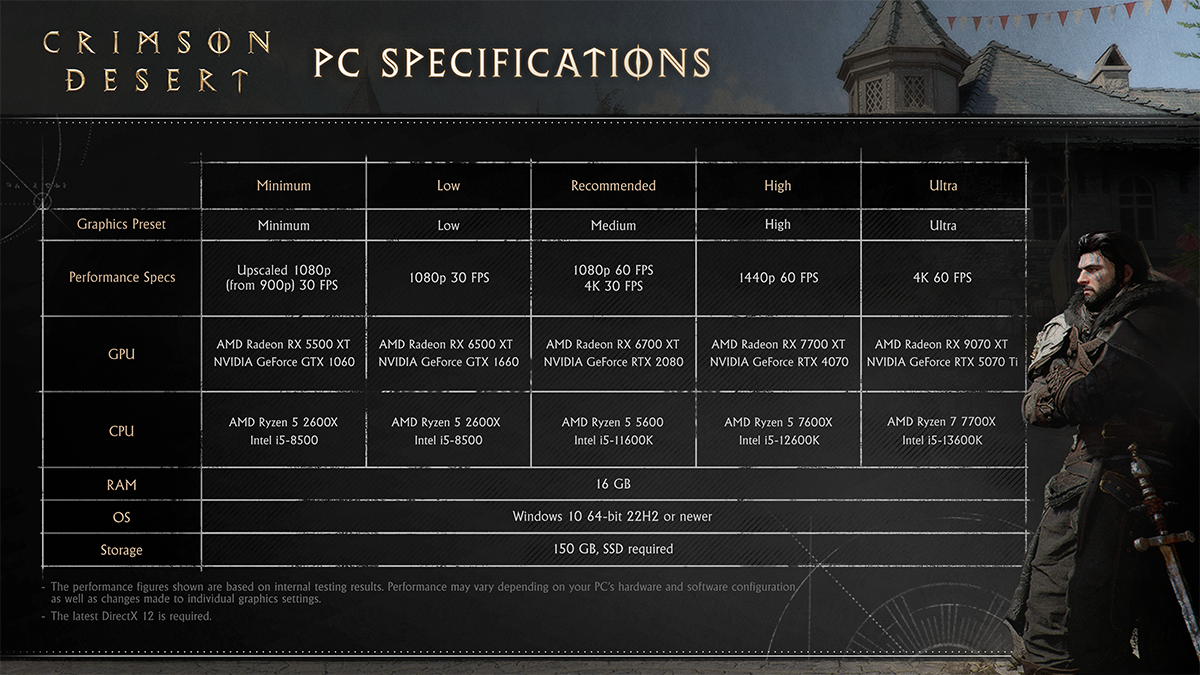
Minimum
| Spec | Requirement |
|---|---|
| Graphics Preset | Minimum |
| Performance | Upscaled 1080p (from 900p) · 30 FPS |
| GPU | AMD Radeon RX 5500 XT / NVIDIA GeForce GTX 1060 |
| CPU | AMD Ryzen 5 2600X / Intel i5-8500 |
| RAM | 16 GB |
| OS | Windows 10 64-bit 22H2 or newer |
| Storage | 150 GB SSD |
Low
| Spec | Requirement |
|---|---|
| Graphics Preset | Low |
| Performance | 1080p · 30 FPS |
| GPU | AMD Radeon RX 6500 XT / NVIDIA GeForce GTX 1660 |
| CPU | AMD Ryzen 5 2600X / Intel i5-8500 |
| RAM | 16 GB |
| OS | Windows 10 64-bit 22H2 or newer |
| Storage | 150 GB SSD |
Recommended
| Spec | Requirement |
|---|---|
| Graphics Preset | Medium |
| Performance | 1080p 60 FPS / 4K 30 FPS |
| GPU | AMD Radeon RX 6700 XT / NVIDIA GeForce RTX 2080 |
| CPU | AMD Ryzen 5 5600 / Intel i5-11600K |
| RAM | 16 GB |
| OS | Windows 10 64-bit 22H2 or newer |
| Storage | 150 GB SSD |
High
| Spec | Requirement |
|---|---|
| Graphics Preset | High |
| Performance | 1440p · 60 FPS |
| GPU | AMD Radeon RX 7700 XT / NVIDIA GeForce RTX 4070 |
| CPU | AMD Ryzen 5 7600X / Intel i5-12600K |
| RAM | 16 GB |
| OS | Windows 10 64-bit 22H2 or newer |
| Storage | 150 GB SSD |
Ultra
| Spec | Requirement |
|---|---|
| Graphics Preset | High |
| Performance | 4K · 60 FPS |
| GPU | AMD Radeon RX 9070 XT / NVIDIA GeForce RTX 5070 Ti |
| CPU | AMD Ryzen 7 7700X / Intel i5-13600K |
| RAM | 16 GB |
| OS | Windows 10 64-bit 22H2 or newer |
| Storage | 150 GB SSD |
Mac system requirements
Set your graphics preset to “For this Mac” on all tiers to let the system automatically optimise visual quality based on your chip’s capabilities. Running on macOS 26 Tahoe or later unlocks frame interpolation and doubles performance targets compared to macOS 15.
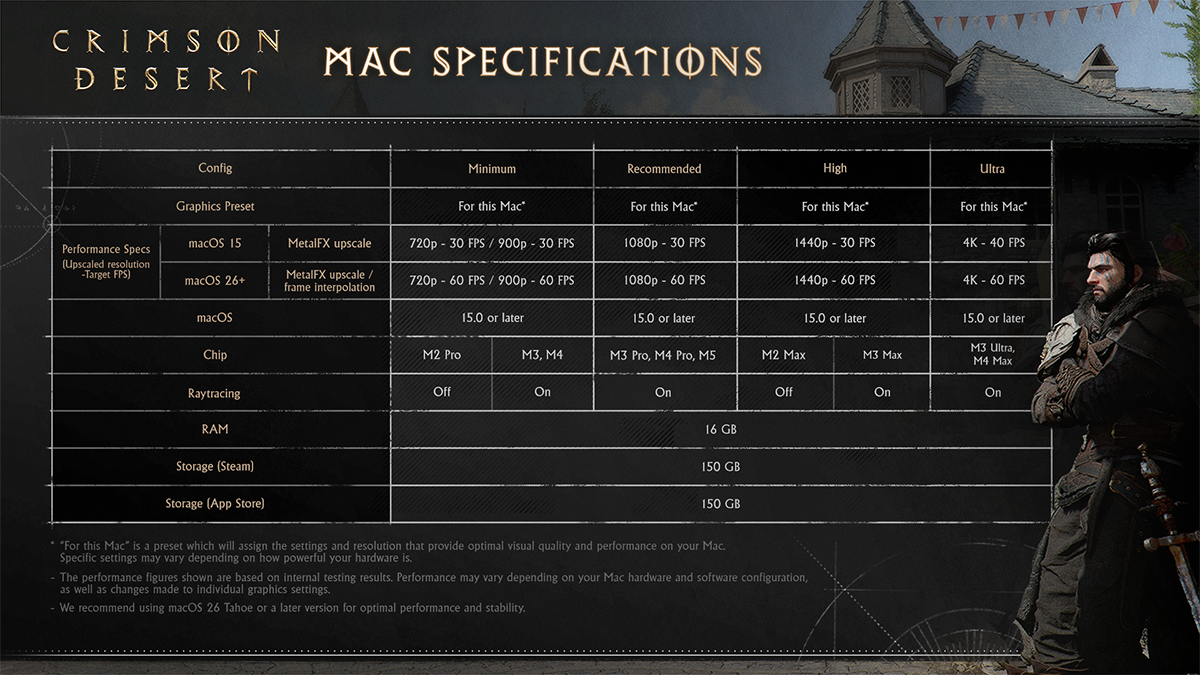
Minimum
| Spec | Requirement |
|---|---|
| Graphics Preset | For this Mac |
| Performance (macOS 15, MetalFX upscale) | 720p · 30 FPS / 900p · 30 FPS |
| Performance (macOS 26+, MetalFX or frame interpolation) | 720p · 60 FPS / 900p · 60 FPS |
| Chip | M2 Pro / M3 / M4 |
| macOS | 15.0 or later |
| Raytracing | Off / On |
| RAM | 16 GB |
| Storage | 150 GB |
Recommended
| Spec | Requirement |
|---|---|
| Graphics Preset | For this Mac |
| Performance (macOS 15, MetalFX upscale) | 1080p · 30 FPS |
| Performance (macOS 26+, MetalFX or frame interpolation) | 1080p · 60 FPS |
| Chip | M3 Pro / M4 Pro / M5 |
| macOS | 15.0 or later |
| Raytracing | On |
| RAM | 16 GB |
| Storage | 150 GB |
High
| Spec | Requirement |
|---|---|
| Graphics Preset | For this Mac |
| Performance (macOS 15, MetalFX upscale) | 1440p · 30 FPS |
| Performance (macOS 26+, MetalFX or frame interpolation) | 1440p · 60 FPS |
| Chip | M2 Max / M3 Max |
| macOS | 15.0 or later |
| Raytracing | Off / On |
| RAM | 16 GB |
| Storage | 150 GB |
Ultra
| Spec | Requirement |
|---|---|
| Graphics Preset | For this Mac |
| Performance (macOS 15, MetalFX upscale) | 4K · 40 FPS |
| Performance (macOS 26+, MetalFX or frame interpolation) | 4K · 60 FPS |
| Chip | M3 Ultra / M4 Max |
| macOS | 15.0 or later |
| Raytracing | On |
| RAM | 16 GB |
| Storage | 150 GB |
PS5 specifications
Both PS5 and PS5 Pro require a compatible display and HDMI 2.1 cable to hit their optimal targets, particularly for 40 FPS VSync (120 Hz display required) and VRR modes.
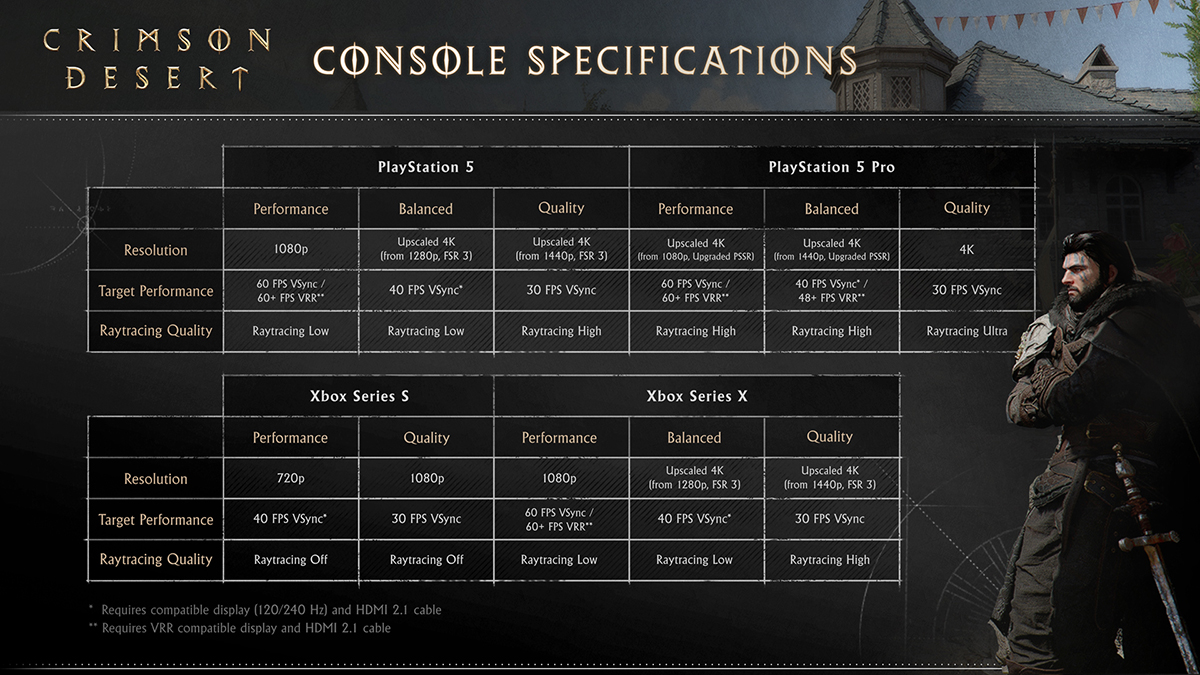
PS5
| Mode | Resolution | Target FPS | Raytracing |
|---|---|---|---|
| Performance | 1080p | 60 FPS VSync / 60+ FPS VRR** | — |
| Balanced | Upscaled 4K (from 1280p, FSR 3) | 40 FPS VSync* | Low |
| Quality | Upscaled 4K (from 1440p, FSR 3) | 30 FPS VSync | High |
* Requires 120/240 Hz display + HDMI 2.1
** Requires VRR-compatible display + HDMI 2.1
PS5 Pro
| Mode | Resolution | Target FPS | Raytracing |
|---|---|---|---|
| Performance | Upscaled 4K (from 1080p, Upgraded PSSR) | 60 FPS VSync / 60+ FPS VRR** | — |
| Balanced | Upscaled 4K (from 1440p, Upgraded PSSR) | 40 FPS VSync* / 48+ FPS VRR** | High |
| Quality | 4K (native) | 30 FPS VSync | Ultra |
* Requires 120/240 Hz display + HDMI 2.1
** Requires VRR-compatible display + HDMI 2.1
Xbox Series S & X specifications
Xbox consoles also require compatible displays and HDMI 2.1 cables for optimal play. The Xbox Series S only supports Performance and Quality modes and cannot enable raytracing at any setting. The Xbox Series X includes Balanced mode and supports raytracing up to High quality.
Xbox Series S
| Mode | Resolution | Target FPS | Raytracing |
|---|---|---|---|
| Performance | 720p | 40 FPS VSync* | Off |
| Quality | 1080p | 30 FPS VSync | Off |
* Requires 120/240 Hz display + HDMI 2.1
Xbox Series X
| Mode | Resolution | Target FPS | Raytracing |
|---|---|---|---|
| Performance | 1080p | 60 FPS VSync / 60+ FPS VRR** | Off |
| Balanced | Upscaled 4K (from 1280p, FSR 3) | 40 FPS VSync* | Low |
| Quality | Upscaled 4K (from 1440p, FSR 3) | 30 FPS VSync | High |
* Requires 120/240 Hz display + HDMI 2.1
** Requires VRR-compatible display + HDMI 2.1
ROG Xbox Ally requirements
The two ROG Xbox Ally handhelds differ significantly in capability. The standard ROG Xbox Ally is limited to Performance mode only, while the ROG Xbox Ally X supports all three graphics modes.
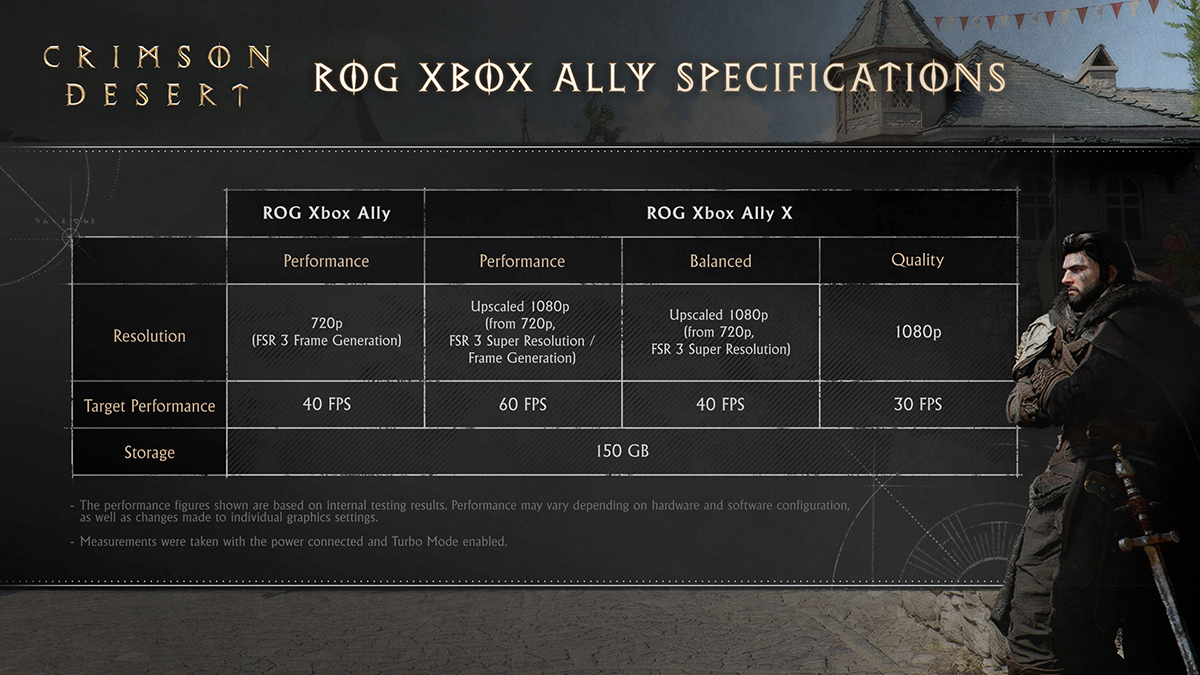
ROG Xbox Ally
| Spec | Details |
|---|---|
| Available Modes | Performance only |
| Resolution | 720p |
| Target FPS | 40 FPS |
| Storage | 150 GB |
ROG Xbox Ally X
| Mode | Resolution | Target FPS |
|---|---|---|
| Performance | Upscaled 1080p (from 720p, FSR 3 Super Resolution) | 60 FPS |
| Balanced | 1080p | 40 FPS |
| Quality | — | 30 FPS |
Storage: 150 GB
File size requirements
| Platform | Required Storage Space |
|---|---|
| PC / Mac | 150 GB (SSD required on PC) |
| ROG Xbox Ally / Ally X | 150 GB |
| PS5 / PS5 Pro | TBD |
| Xbox Series X/S | TBD |
Console storage requirements for PS5 and Xbox Series X/S have not been officially confirmed yet, though they are expected to be similar to the PC version.
Pro tip: Mac players on the same chip can unlock a significant, free performance boost simply by upgrading to macOS 26 Tahoe — frame interpolation doubles the target frame rate at equivalent resolution tiers (e.g., from 30 FPS to 60 FPS at 1080p on Recommended) without any hardware change.
Add hthgaming.com as a preferred source on Google