

Use Auto-Hunt in Blade & Soul Revolution offline mode to gain EXP and Silver while the game isn’t actively running.
What is Offline Auto-Hunt?
The function, unlocked after completing the main quest in Act 2 – Chapter 2, allows you to hunt while the game isn’t actively running.
You may only log in as the character running Offline Auto-Hunt.
Any applicable stats from Equipment and Pets will be taken from when Auto-Hunt in offline mode was started.
The EXP and Silver gained will be lower than what is obtained from active play. Loot and items won’t be obtained.
Quests are unavailable in this mode. (ex. Conquest Missions, Reputation, etc.)
Requirements
Requirements to start Offline Auto-Hunt
1. When daily Auto-Hunt time is available
2. Character has weapons equipped
3. Character is located in a normal hunting area
When Offline Auto-Hunt is Not Available
1. If Character’s Total Attack Power and Total Defense don’t meet the hunting area’s recommended requirements
2. If the Character doesn’t have enough of the required items (Healing Tonics, Pet Pods)
How to Start Offline Auto-Hunt
Open up Power-Saving Mode in a normal hunting area, then tap [Offline Auto-Hunt] to begin.
![Open up Power-Saving Mode in a normal hunting area, then tap [Offline Auto-Hunt] to begin](https://hthgaming.com/wp-content/uploads/2020/05/bnsr-offline-auto-hunt-01.jpg)
![Open up Power-Saving Mode in a normal hunting area, then tap [Offline Auto-Hunt] to begin](https://hthgaming.com/wp-content/uploads/2020/05/bnsr-offline-auto-hunt-02.jpg)
Logging-in again as the character running Offline Auto-Hunt will automatically end the mode, and rewards will be provided proportionally to the time spent in Auto-Hunt.
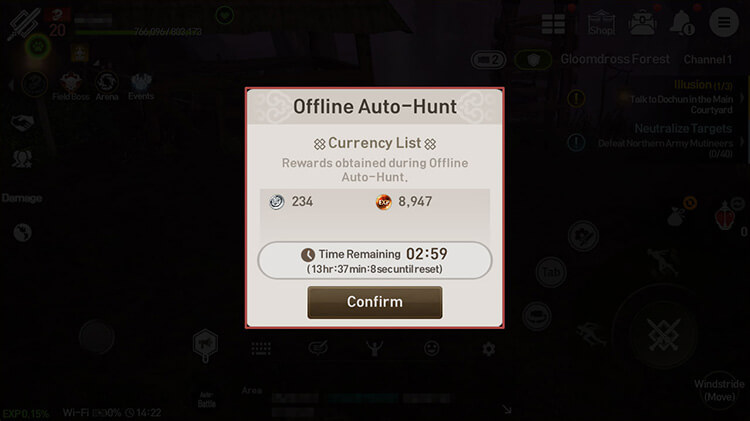
Offline Auto-Hunt has a daily allotment of 3 hours. Daily hours reset every morning at 4 AM (UTC +8).
Add hthgaming.com as a preferred source on Google