

Quick Slot
You can add the items and skills you want to use to the empty quick slot.
The function of auto-use can be set for items or skills added to quick slots.
Quick slots can be set automatically by using the [Quick Slots] button at the bottom of the screen.
Some of the skills listed in the quick slots are not available for the auto-function.
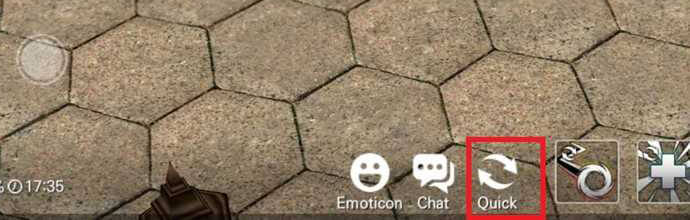
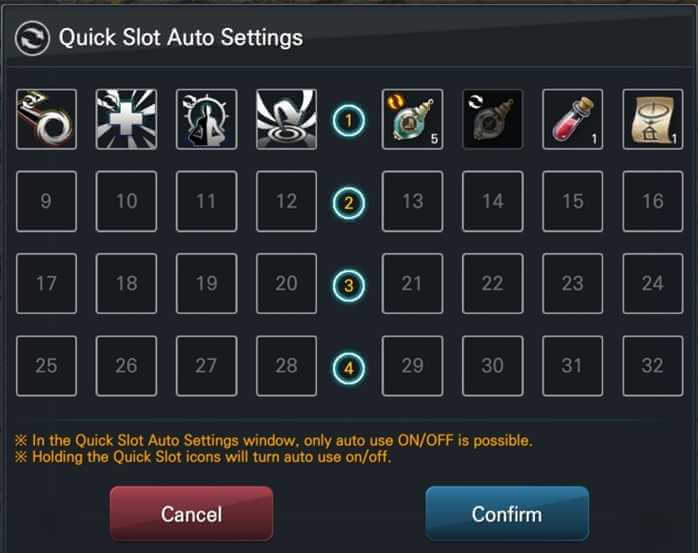
Activate Quick slots to use the function automatically!
Items or skills that can be enabled for auto usage, such as the green arrow marker above, there will be double arrows at the top of the icon to indicate that the auto usage can be enabled
By clicking on the icon of the skill or item that can be enabled for auto usage, you can enable the auto usage function, as shown in the yellow arrow mark above
Another way to use the auto usage function is to enable it by pressing and holding on the skill or item icon for a certain period.
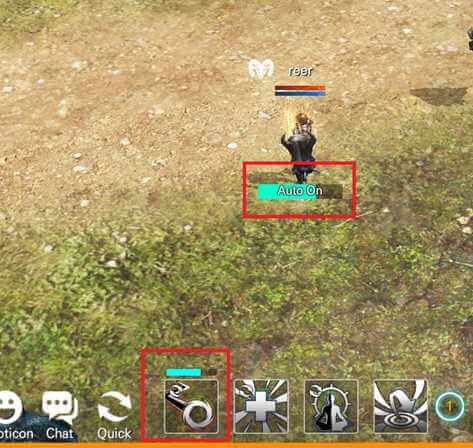
The priority of auto usage of Quick slots
When the auto usage of quick slot is enabled, the slots will be used in order.
When there is a shortage of buff or MP, the next slot skill will not be used automatically until the buff is used.
In the case of the item that does not consume MP, if there is no buff in use, it will immediately be use automatically.
Tip
Box items can also be automatically used by putting them on the quick slot.
If there are too many boxes, you can use the auto usage function to make it easier to use the items.
Add hthgaming.com as a preferred source on Google