

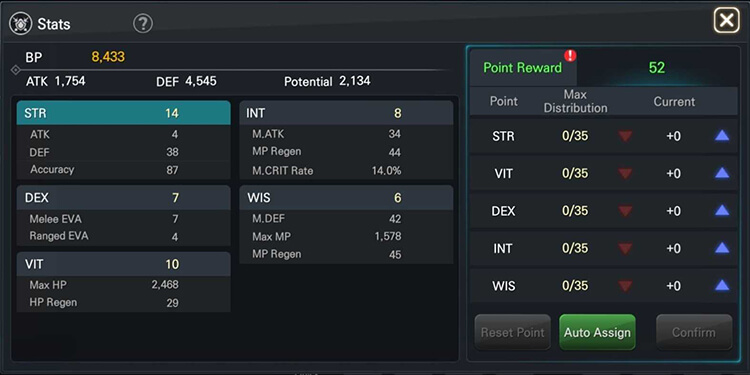
Ability Points
In EOS RED game, after the character upgrades, new ability points will be added in a certain level range.
After configuring the new ability points, the battle power can be increased.
1 ability point will be added for every 5 levels, and 1 ability point will be added for every level above 45 levels
After assigning the ability points, press OK to finish assigning the ability points.
Tips
You can use the hourglass to reset the character’s ability points
The Hourglass can be purchased from the [Shop > Normal] menu.
The system will automatically assign ability points according to the appropriate strategy for the class after the recommended assignment is set.
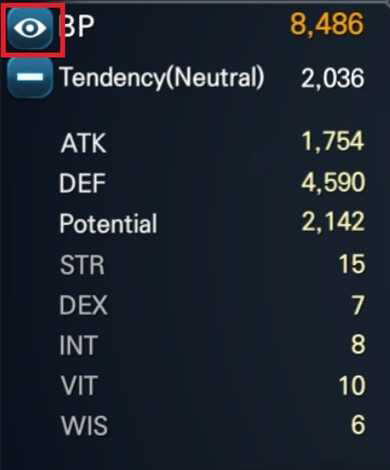
Attack Power
Attack power is the sum of all abilities that allow you to check a character’s overall combat ability at a glance.
Attack power is affected by the character’s stats, equipment, buffs, and soul stones.
You can check the detailed information of the combat power through the View Power Details button.
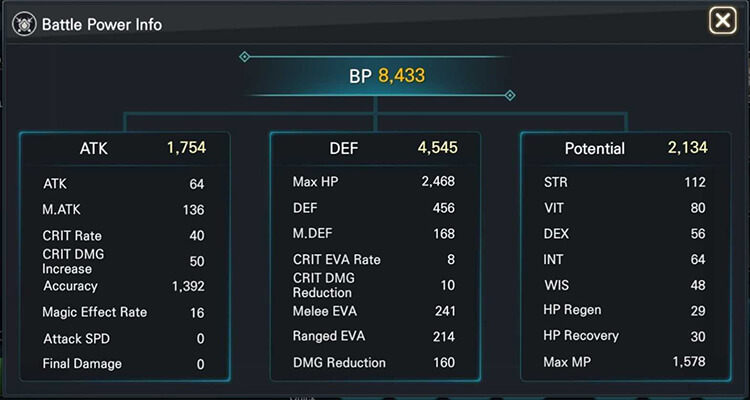
View details of attack power
In the attack power detail view, you can check the character’s power factor in detail.
You can check more information below through the slides for attack, defense, and potential content.
Add hthgaming.com as a preferred source on Google